How to type Sanskrit diacritics in Mac OS X
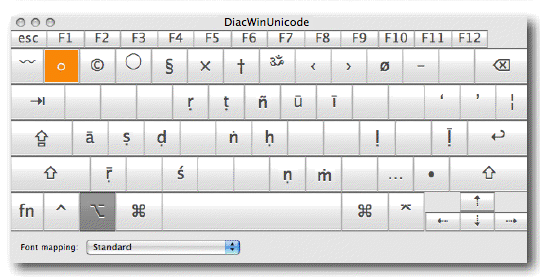
The following instructions make it very easy for you to type Sanskrit diacritical characters on your Mac computer running OS X.
1. Download “DiacWinUnicode.keylayout” at:
https://krishna.org/diac/DiacWinUnicode.keylayout
2. Move “DiacWinUnicode.keylayout” to “/Library/Keyboard Layouts/”
3. Click apple icon in upper-left corner of screen ->
“System Preferences” ->
“Language & Text” ->
“Input Sources”
4. Check “DiacWinUnicode” box
5. Click Input Source icon (i.e. American flag icon for U.S.) near upper-right corner of screen ->
check “DiacWinUnicode”
6. Now you can type Sanskrit characters (ā ḷ ṇ ś ḍ ṁ ṛ ṭ ḥ ṅ ṝ ū ī ñ ṣ ḹ):
Opt+a long-a
Opt+l l-dot
Opt+n n-dot
Opt+c s-accent
Opt+d d-dot
Opt+m m-dot
Opt+r r-dot
Opt+t t-dot
Opt+h h-dot
Opt+g n-super-dot
Opt+z long-r-dot
Opt+u long-u
Opt+i long-i
Opt+y n-tilde
Opt+s s-dot
Opt+’ long-l-dot
For CAPITALIZED characters add “Shift” (Ā Ḷ Ṇ Ś Ḍ Ṁ Ṛ Ṭ Ḥ Ṅ Ṝ Ū Ī Ñ Ṣ Ḹ):
Opt+Shift+<character>
For additional help, see “Transliterated Text in Mac OS X.pdf”:
https://krishna.org/diac/TypingTransliteratedTextinMacOSX.pdf

Related Posts
Installing Original Books Prabhupada Vedabase on your Computer →
MS-DOS Prabhupada Vedabase / Folio Views →